
GMap for WP
Easily integrate Google Maps into WordPress posts, pages, or sidebars. Just copy and paste the shortcode, enhancing search engine traffic. No coding skills needed.


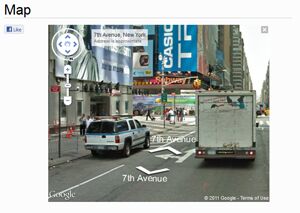


Effortlessly add Google Maps to your WordPress posts, pages, or sidebars with this versatile plugin, enhancing your search engine traffic.
Simply copy and paste the provided shortcode into your WordPress posts or pages to seamlessly integrate interactive maps.
This user-friendly tool requires no coding skills, making it accessible to anyone looking to enrich their website with functional maps.
Terms
- [YES] Can be sold
- [YES] Can be used for personal use
- [YES] Can be packaged with other products
- [YES] Can modify/change the sales letter
- [YES] Can be added into paid membership websites
- [YES] Can put your name on the sales letter
- [YES] Can be offered as a bonus
- [YES] Can be used to build a list
- [YES] Can print/publish offline
- [YES] Can convey and sell Personal Use Rights
- [YES] Can convey and sell Resale Rights
- [YES] Can convey and sell Master Resale Rights
- [YES] Can be translated to other languages
- [YES] Can be added to shops/memberhips containing more than 500 products
- [NO] Can modify/change the main product
- [NO] Can modify/change the graphics and ecover
- [NO] Can be given away for free
- [NO] Can be added to free membership websites
- [NO] Can convey and sell Private Label Rights
Loading preview. Please wait...
- /
-
- GMapForWP
- Product
- GMap for WP
- icons
- black-pin.png
- blue-pin.png
- chat.png
- flag.png
- fountain.png
- fullscreen.png
- green-pin.png
- grey-pin.png
- house.png
- red-pin.png
- shop.png
- star.png
- white-pin.png
- yellow-pin.png
- enc.lib.php
- gmap-for-wp.php
- How to use.pdf
- Salespage
- images
- 5-stars-rating.jpg
- GMap for WP-ministe.jpg
- GMap for WP.png
- GMap for WP 2.png
- bg-top.jpg
- body.jpg
- download-button.jpg
- footer.jpg
- header.jpg
- header1.jpg
- header2.jpg
- screenshot1.png
- screenshot2.png
- index.html
- installation.html
- screenshot.html
- style.css
Related Products


